Strawberries Tiramisù

At GUADEC John (J5) Palmieri announced the GNOME Cookbook project, this delicious dessert is my first contribution to the project, I hope you like it! The Italian translation of the recipe is on my cooking blog.

Ingredients

  • 4 eggs
  • 3/4 cup (150 g) sugar
  • 1 pound (500 g) mascarpone cheese
  • salt
  • 1 3/4 lbs. (800 g) strawberries
  • 1/2 lemon
  • 2 tbs. rum
  • 3/4 lbs. (340 g) savoiardi (lady fingers)

Instructions

Update: I have an updated version of this recipe on my cooking blog.

Whisk the yolks with half of the sugar making a cream, then add mascarpone cheese and rum. In a bowl whip the egg whites to hard peaks with a pinch of salt and add them to the mascarpone cream.

Wash the strawberries in very cold water and cut off the tops. Place in a blender 1 lb. strawberries, the lemon juice and the remaining sugar, and blend to puree.

Arrange a layer of savoiardi dipped in the juice in a serving dish and spread with some cream. Repeat layering with remaining savoiardi and cream.

Slice remaining strawberries and garnish the tiramisù with them.

Place in the refrigerator for some hours so the savoiardi can soften and absorb the juice.
File transfers and Empathy/2

With the old dialog you had a window for each file transfer but this could be a problem if you are transferring more than a couple of files at the same time. So this week I rewrote the file transfer dialogs and submitted the patch to add file transfer to Empathy (see bug #462172).


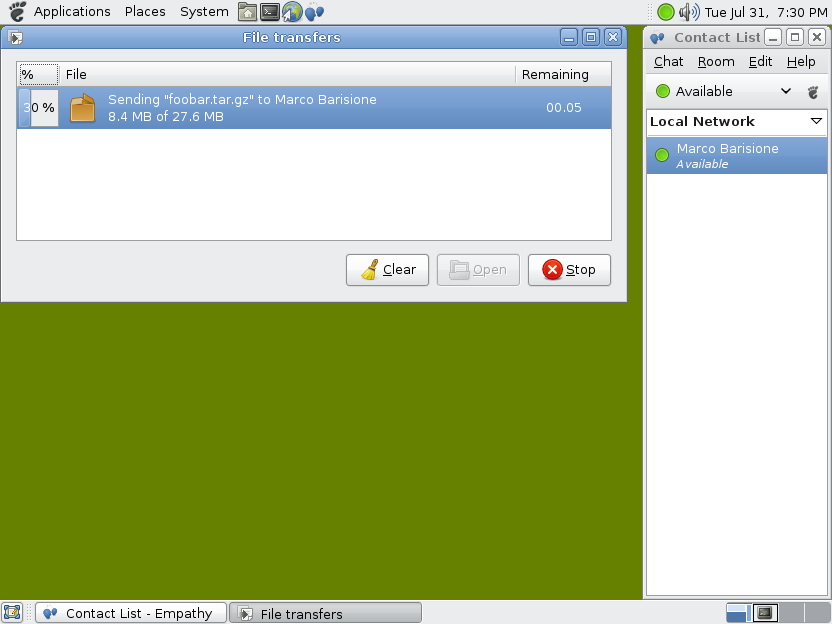
The new file transfer dialog

The new dialog is copied from Epiphany but I had to make some changes because we cannot open automatically each received file, so I added a Firefox-like clear button. The thing I don’t like in the window is that it communicates the current progress in three different ways: the percentage (“30 %”), the number of transferred bytes (“8.4 MB of 27.6 MB”) and the remaining time (“00.05”).


Sending a file


Receiving a file

Weapons of mass destruction

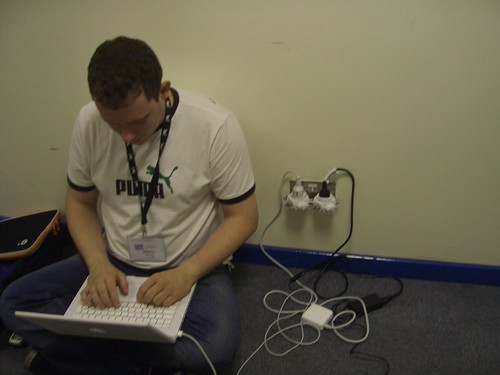
Every person going through the corridor where I was sitting yesterday seemed scared by the two strange things in the power sockets, be quiet! They are not weapons of mass destruction, just the best power adapters we found in Vercelli. And, in spite of them, we didn’t break any power socket unlike everybody else here at the Etap hotel.

Now it’s time to try to find a way to reach the Stansted airport in spite of the weather, this page is not very reassuring :'(.

Update: I’m now at home, a lot of trains were cancelled but luckily mine was on time.

Internet access for everyone at Etap hotel

If you are at the Etap hotel and you get “Error: The maximum number of subscribers has been reached” just find someone with Internet access that can route you and make him type this as root:

echo 1 >> /proc/sys/net/ipv4/ip_forward
iptables -t nat -A POSTROUTING -j MASQUERADE

Then you should type (as root):

route del default gw 10.71.0.1
route add default gw route add default gw $IP_WITH_INET_ACCESS

Tip kindly provided by em :).

File transfers and Empathy

This week I worked on adding file transfer support to Empathy for the Telekinesis project. Empathy with my patches (the code is not yet in SVN trunk) can exchange files using every connection manager that supports file transfer, that is just telepathy-salut (aka bonjour, aka XEP-0174, aka link-local messaging) for now :).

libempathy, the non-GUI library wrapping the telepathy interfaces, will get a class to handle file transfer channels (i.e. org.freedesktop.Telepathy.Channel.Type.FileTransfer) and a class for single file transfers, which are just IDs in Telepathy.
The dialog, in libempathy-gtk, was copied from Gossip, I’m going to modify it later to better fit our needs and to solve some problems, for instance now you cannot choose the file name, only the directory where to save the file.

This work is far from perfect but I can already show some screenshots and videos:


Receiving a file


Sending a file (Ogg Theora video, 150 kB)


Receiving a file (Ogg Theora video, 138 kB)

Tomorrow I will arrive at the Birmingham train station around 5 PM. See you all there!

Telekinesis and source control

Havoc, the jhbuild moduleset for Telekinesis was written before deciding any technical detail on the project, so it builds everything including avahi! As soon as the project becomes usable by someone other than me I want to remove unneeded libraries and add a comment suggesting to skip libraries which have recent versions packaged for common distros.

Mercurial is used only by salut-chat, a simple and ugly Python script I use to test telepathy-salut (the library I’m working on at the moment). When telepathy-salut will get more tests and empathy will support file transfer I plan to kill salut-chat removing the need for Mercurial.

This means that when Telekinesis will start to be useful it will require only darcs (used by Telepathy) and svn (used by mission control and empathy). Anyway, if you are interested in telepathy-salut for Big Board, I can already try to reduce the number of needed modules.

By the way, I agree that a question before pulling each patch is silly, to resolve it use “darcs pull -a“.

Telekinesis

As said in previous posts, I’m working on a SOC project, called Telekinesis, to make easy to transfer files over a LAN.

Telekinesis

For now I modified telepathy-salut (the Telepathy connection manager that handles link-local connections) adding file transfer support, but at the moment chat programs are not yet able to use it so it’s still completely useless for you :).

My next steps are to improve the code in telepathy-salut and then add file transfer support to Empathy.

Setup programs for Windows

Alberto, why did you chose NSIS to build setup programs? I don’t like it because its scripting language seems a mix between assembly and shell scripting and it doesn’t even have flow control statements, you have to use Goto!

Moreover you have to do manually everthing, for instance to copy a file that later can be uninstalled you need this code:

; Copy the file
File "example.exe"

; Create shortcuts.
CeateDirectory "$SMPROGRAMS\Example"
CreateShortCut "$SMPROGRAMS\Example\Uninstall.lnk" "$INSTDIR\uninstall.exe" "" "$INSTDIR\uninstall.exe" 0
CreateShortCut "$SMPROGRAMS\Example\Example.lnk" "$INSTDIR\example.exe" "" "$INSTDIR\example.exe" 0

; Copy the uninstaller.
WriteUninstaller "uninstall.exe"

; Write the uninstall keys for Windows.
WriteRegStr HKLM "Software\Microsoft\Windows\CurrentVersion\Uninstall\Example" "DisplayName" "NSIS Example"
WriteRegStr HKLM "Software\Microsoft\Windows\CurrentVersion\Uninstall\Example" "UninstallString" '"$INSTDIR\uninstall.exe"'
WriteRegDWORD HKLM "Software\Microsoft\Windows\CurrentVersionUninstall\Example" "NoModify" 1
WriteRegDWORD HKLM "Software\Microsoft\Windows\CurrentVersion\Uninstall\Example" "NoRepair" 1 WriteUninstaller "uninstall.exe"

And then you have to uninstall everything manually:

; Delete registry keys.
DeleteRegKey HKLM "Software\Microsoft\Windows\CurrentVersion\Uninstall\Example"

; Remove files and uninstaller.
Delete $INSTDIR\example.exe
Delete $INSTDIR\uninstall.exe

; Remove shortcuts.
Delete "$SMPROGRAMS\Example\Uninstall.lnk"
Delete "$SMPROGRAMS\Example\Example.lnk"
RMDir "$SMPROGRAMS\Example"

; Remove the program directory.
RMDir "$INSTDIR"

I prefer Inno Setup, the nice thing is that for common tasks (copying files, creating shortcuts, adding registry keys, etc.) you only have to write a simple ini-like file, but if you need something more powerful you can use Pascal scripting.

The previous example in Inno Setup would be:

[Files]
Source: "example.exe"; DestDir: "{app}"

[Icons]
Name: "{group}\Example"; Filename: "{app}\example.exe"
Name: "{group}\Uninstall"; Filename: "{uninstallexe}"

Please, use Inno Setup! :)