Vista miracles

A month ago my desktop computer died, Windows XP (both the installed version and the installer) was crashing while booting and using Linux live CDs I was only able to get kernel panics.

As a student of the Politecnico di Torino I can have a free copy of Windows Vista Business and other Microsoft products (see the MSDNAA web page of my university.)

Today I tried to install Vista on my dead computer without any hope to finish the setup, but wow, Vista was installed correctly and now the computer is working. This mean that now I have to use Vista, I’m sad :(.

Small things that matter / 2

After the post on the “Empty Trash” button in the trash folder, I’m looking for other small changes in GNOME 2.17, i.e. the development version for GNOME 2.18. These are not the big changes everyone can see like the new Control Center, but those small things that are improving GNOME version after version.

In the following screenshots you can see Glossy, a new theme included in 2.18 (to tell the truth it’s not a real theme, but just an option to the ClearLooks theme.)

GNOME 2.18

We will have a UI for configuring theme colors, see this post by Tim Retout.

Theme selection

GNOME Screenshot has a new dialog displayed when you pass --interactive to the program, the default if you launch the utility from the menu. Thanks Emmanuele!

gnome-screenshot

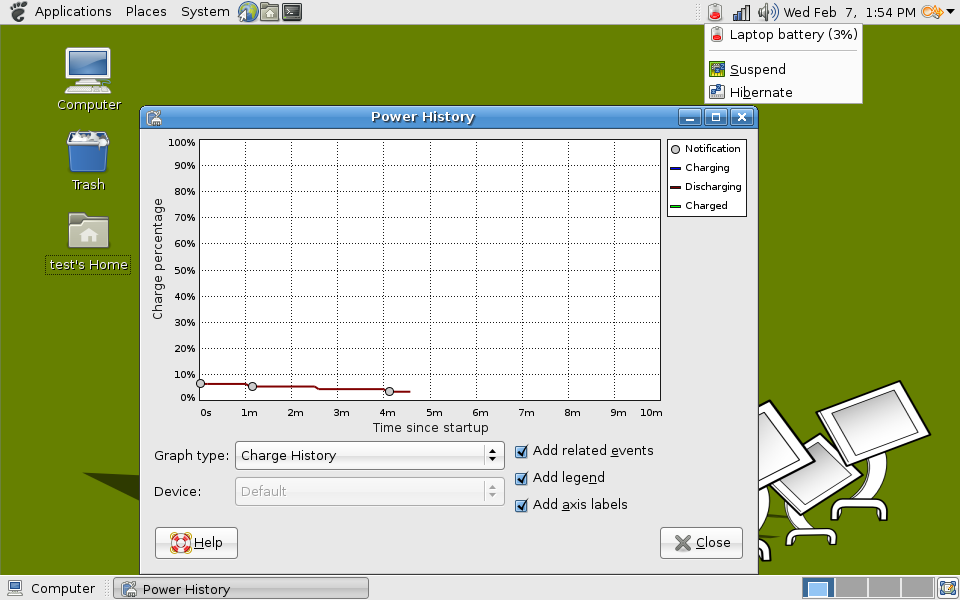
The UI of GNOME Power Manager was cleaned up, now the menu is much more readable and the ugly “Power History” window with lots of tabs has been improved too.

gnome-power-manager

Some minor changes were done to the “Startup Programs” tab in gnome-session-properties, spot the differences!

gnome-session-properties

The last small improvement I found is the new “System” tab in GNOME System Monitor, see this, this, and this.

gnome-system-monitor

Arrays of strings and relocation

While working on GRegex (Perl-style regular expressions for GLib) I discovered that arrays of string pointers can cause lots of relocations.

Relocation is the process of adjusting the pointers whose value is unknown at link-time, such as the pointer to a function is a dynamically loaded library.

In PCRE (the library used by GRegex) there is a table used to associate the name of a script, such as Latin or Arabic, to its properties:

const ucp_type_table _pcre_utt[] = {
  { "Any",      PT_ANY, 0 },
  { "Arabic",   PT_SC,  ucp_Arabic },
  { "Armenian", PT_SC,  ucp_Armenian },
  ...
  { "Zs",       PT_PC,  ucp_Zs }
};

The strings (they are more than 100!) are placed in read-only memory, while the _pcre_utt array will be placed in writeable memory, so the dynamic loader has to do a relocation for each string. The number of relocations in libglib with GRegex was:

libglib-2.0.so: 290 relocations, 263 relative (90%), 131 PLT entries, 1 for local syms (0%), 0 userstable

Without GRegex:

libglib-2.0.so: 90 relocations, 63 relative (70%), 131 PLT entries, 1 for local syms (0%), 0 users

A possible solution is to replace the strings in the table by offsets into one big string constant.

const char _pcre_ucp_names[] =
  "Any\0"
  "Arabic\0"
  "Armenian\0"
  ...
  "Zs";

const ucp_type_table _pcre_utt[] = {
  { 0,   PT_ANY, 0 },
  { 4,   PT_SC,  ucp_Arabic },
  { 11,  PT_SC,  ucp_Armenian },
  ...
  { 653, PT_PC,  ucp_Zs }
};

The result after this operation is:

libglib-2.0.so.0.1300.0: 187 relocations, 160 relative (85%), 131 PLT entries, 1 for local syms (0%), 0 users

Using the same technique on the other arrays in PCRE and GRegex, we reduced the number of relocations, now the results are similar to the ones obtained without GRegex:

libglib-2.0.so.0.1300.0: 102 relocations, 75 relative (73%), 131 PLT entries, 1 for local syms (0%), 0 users

The number of relocations was obtained using the relinfo.pl script by Ulrich Drepper. If you want to know something more about dynamic libraries, you can read How To Write Shared Libraries by the same author.

UPDATE: Declare _pcre_ucp_names as a char [] instead of char *, as suggested by Ulrich Drepper.

Internet Explorer on Linux

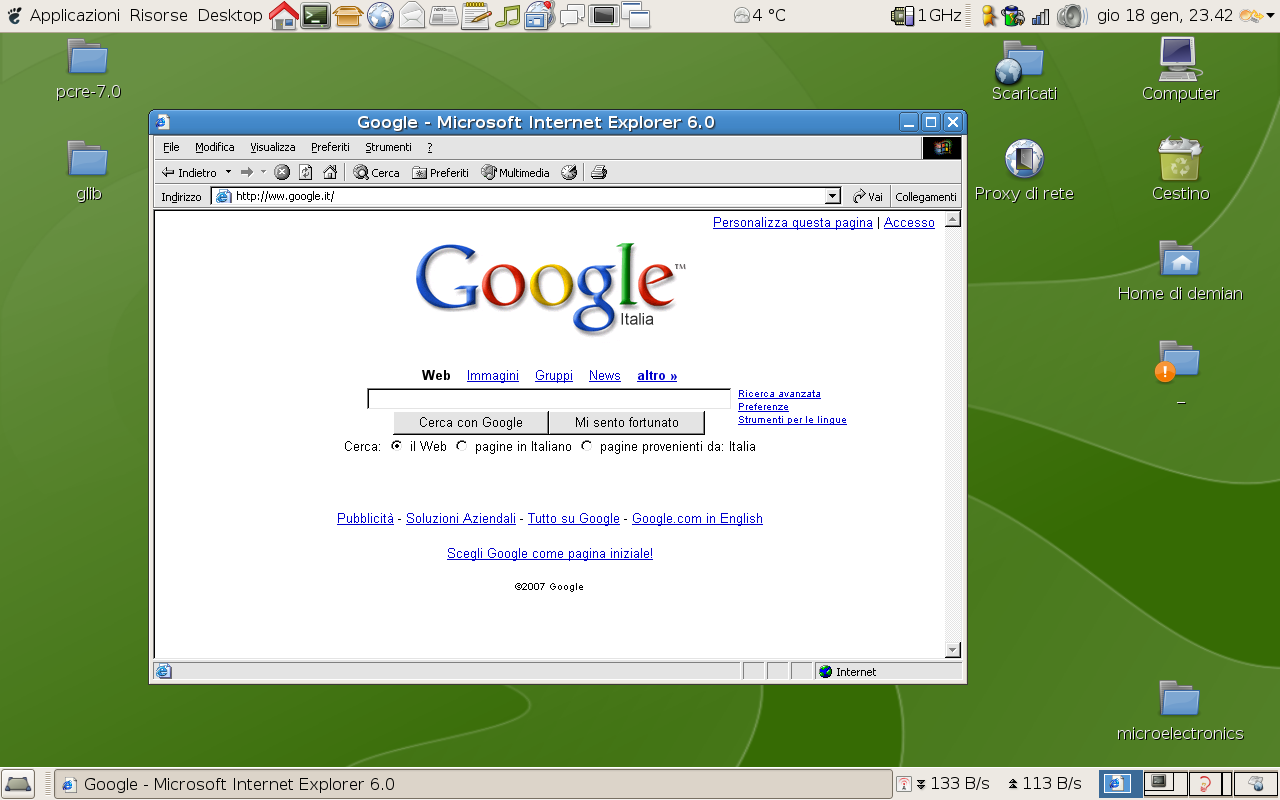
When developing my web sites I need to test them with Internet Explorer, after all it’s the most used browser. As my home computer (running Windows) died, I tried IEs4Linux.

Internet Explorer 6 on Linux

The stable version of IEs4Linux can run Internet Explorer 5, 5.5 and 6. If you want to run IE 7 (or better the GUI of IE 6 with the engine of IE 7) you need the 2.5 beta version. To run all these versions of Internet Explorer under Debian unstable, install wine and cabextract, then follow these instructions:

wget http://www.tatanka.com.br/ies4linux/downloads/ies4linux-2.5beta2.tar.gz
tar xzf ies4linux-2.5beta2.tar.gz
cd ies4linux-2.5beta5/
./ies4linux --install-ie5 --install-ie55 --beta-install-ie7

DNS problems

In these days using the Internet is a real pain for lots of Italians. The former TLC monopolist claims that the problems are due to viruses, but this does not explain why the service with the biggest problems is DNS, host name resolution requires at least 10 seconds! This is why I have been using OpenDNS for some days. Note that I don’t care about phishing protection and the other stuff offered by OpenDNS, but it’s fast and reliable.

BTW, merry Christmas!

GSpell

As already said we are going to have spell checking in GTK+. No more GnomeSpell, GTKSpell, SexySpellEntry, the gedit plugin, all using different libraries for spell checking and with several different problems!

I’m working on the glib side of this project, GSpell will be the low level spell checking library that will be the base of the future GTK+ spell checking stuff. The Mercurial repository is at http://techn.ocracy.org/gspell, the relevant bug is #383706.

GSpell has the same goals of Enchant and shares a lot of code with it. Probably the next version of Enchant will be just a wrapper around GSpell.

Spell checking in GNOME

Behdad Esfahbod proposed to add spell checking, based on the Enchant library, to GLib and GTK+.

I tried some existing spell checking tools for GNOME:

Some time ago I wrote with Emanuele Aina some code forked from gedit. This, temporarily called GnomeSpellChecker, is unreleased and unfinished but has some interesting features, such as multi-language support.

In this post I’m considering only the UI of these libraries, I will read and analyze the code in the following days.

The contextual menu

All the libraries use the same approach, the wrong words are underlined in red. The popup menu displays the suggestions in a sub-menu.

GtkSpell3
GtkSpell3

SexySpellEntry
SexySpellEntry

gedit
Gedit spell checking plugin

In GtkSpell3 and SexySpellEntry I don’t like the gtk-remove icon for the “Ignore” item. In gedit I don’t like the “…” after the “Spelling suggestions” string and the bold font for the suggestions.

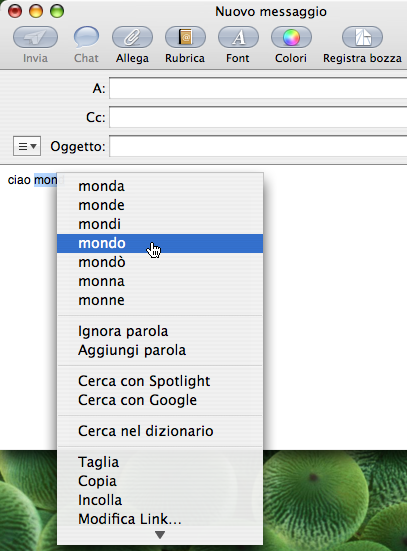
Microsoft Word’s menu is similar, instead Apple programs add the suggestions directly to the contextual menu.

Mail spell checking
Spell checking in Mail

Multilanguage support

The new spell checking stuff in GTK+ should allow to check more languages in the same widget. A good approach would be to recognize the language of a paragraph, as done by Microsoft Word, for this see libtextcat and its competitors. Paolo Maggi thinks that this is out of the scope of the spell checking library since it’s an application specific problem.

A simpler solution is to check words in the union of the used dictionaries. This is supported only by GtkSpell3 and by GnomeSpellChecker.

Multiple languages in GtkSpell3
Spell checking with multiple languages in GtkSpell3

The GtkSpell3 implementation does not seem to work, “mondo” is in the Italian dictionary but it’s considered mispelled. I don’t like the multi-language menu because it adds another submenu, I propose something similar to the image below (made with GIMP):

Proposal for the contextual menu

Configuration

It would be a good thing to have a tool for control-center to set the languages, but please do not add yet another item to the preferences menu!

GnomeSpellChecker dialog to set the languages

This configuration tool could have some other options, e.g. to ignore words with numbers.

All the libraries can add a word to the personal dictionary, but there is no way to remove wrong words from it. It would be good to add such feature to the configuration tool.

Spell checking dialog

GtkSpell3 and SexySpellEntry do not have a dialog to do spell checking, this could be useful for longer texts, such as text files in gedit or forms in Epiphany. Word and AbiWord use similar dialogs, shown in the images below.

Word spell checking dialog

AbiWord spell checking dialog

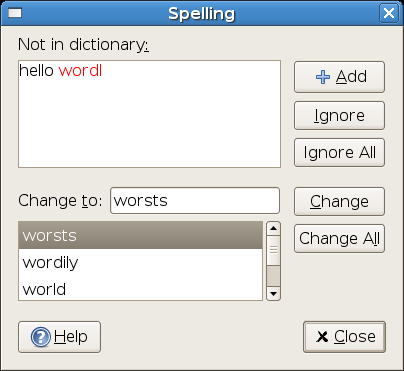
I prefer the gedit dialog, but it does not show the context of the wrong word, this means that it could be difficult to understand what the word should be.

Gedit spell checking dialog

GnomeSpellChecker spell checking dialog

UPDATE: updated the menu proposal as suggested by Paolo.