I want it!

The hackergotchis for our server‘s users have been updated for Halloween by Alessandro!

Ahoy!
Gnome 2.20 has a new Clearlooks version, known during development as Gummy. The main new features are blue scrollbars, fading tabs and rounded toolbars.

Clearlooks (gummy)

ClearlooksClassic
If you don’t like the new theme you can use ClearlooksClassic, or just disable the single features you don’t like. To do so, just open (or create if it doesn’t exist) the .gtkrc-2.0 file in your home directory and set the options you prefer:
style "my-clearlooks" = "clearlooks-default"
{
    engine "clearlooks"
    {
        colorize_scrollbar = TRUE  # TRUE = blue scrollbars
        menubarstyle       = 2     # 0 = flat, 1 = sunken, 2 = flat gradient
        toolbarstyle       = 1     # 0 = flat, 1 = enable effects
        animation          = FALSE # TRUE = animated progress bars
        style              = GUMMY
    }
}

class "*" style "my-clearlooks"
Animations work only if --enable-animation was used at configure-time.
If you want the old style for notebook tabs use:
style "my-clearlooks-notebook" = "clearlooks-notebook"
{
    engine "clearlooks"
    {
        style = CLASSIC
    }
}

class "GtkNotebook" style : highest "my-clearlooks-notebook"
Personally, I like blue scrollbars and toolbars, but I’m unsure about fading tabs. Nevertheless, I’m probably going to disable rounded toolbars as they are ugly when there are more bars (such as in nautilus or in file-roller) and in Evolution (the background of the “New” button is flat).

Two toolbars in file-roller

Evolution and Clearlooks
Beamer is a LaTeX class that allows you to easily create presentations. It contains several themes, but they are a bit ugly, so I wrote a new theme (named Torino) that I’m going to use for the slides for my graduation dissertation.
The look of the theme is based on a layout by Novell/SUSE and the nouvelle color theme uses the same colors of that one. There are other two color themes: chameleon, similar to nouvelle but green only, and freewilly, a blue theme that should look good even with crappy projectors.
The theme accepts some options that allow you to change the logo, the watermark, bullet lists, etc.


Chameleon


Nouvelle


Freewilly
A big thank you to Alessandro Finamore who helped me with the realization of the theme.
I usually prefer oven ready lasagna as it doesn’t need to be boiled before assembling the dish, but you can also use dried or fresh lasagna or prepare the pasta on your own. In the latter case you can use the lasagna recipe written by Fabio Rosciano.
If you are using non-oven ready pasta you have to boil it for some minutes and then drain it, removing completely the water.
The Italian translation of the recipe is on my cooking blog.

Prepare the béchamel sauce. Heat the butter over low heat until melted, then add the flour all at once and stir until smooth. Cook over low heat for 3 minutes stirring constantly. Add milk (at room temperature or hot) and cook for about 5 to 7 minutes, stirring constantly. Add salt, pepper and some nutmeg.
Prepare the filling. Cut the sausage casing lengthwise and remove it. Heat the olive oil in a large skillet over medium heat. Add the sausage and cook, stirring and breaking up the meat with a spoon, for 5 minutes. Add leeks, salt and wine, and cook for 15-20 minutes, stirring frequently.
Assemble. Arrange a layer of lasagna in a buttered baking dish, spread with some béchamel, some leeks and sausage mixture, and a thin scattering of Parmesan cheese. Repeat with remaining ingredients, ending with béchamel and a good sprinkling of Parmesan.
Pre-heat the oven to 375º F (190° C) and bake for about 25 minutes.
Yet another recipe for the GNOME Cookbook, the Italian translation of the recipe is on my cooking blog.
Molten chocolate cake is a dessert, probably created by Jean-Georges Vongerichten, that looks like a normal small cake but has an almost liquid center. It may look difficult to cook, but the recipe is indeed very simple and doesn’t require more than 20 minutes (excluding baking and cooling time).
This dessert is usually served hot but leftovers can be refrigerated and eaten cold the next day (the centers will have a mousse-like consistency) or warmed in microwave.

Melt the chocolate and butter together in bain marie, that is in a bowl over a pot of hot water, and then let cool for a few minutes.
Whip eggs, egg yolks, sugar and a pinch of salt until you get a light yellow color. Add the melted chocolate and the flour.
Grease and flour 5 or 6 ramekins (or oven-proof glass cups) tapping out the excess flour. Divide the chocolate cream among the ramekins, cover with plastic wrap and place in the refrigerator for about one hour or until you are ready to bake.
Pre-heat the oven to 450° F (230° C) and bake for about 13 minutes. Remove from the oven, run a sharp knife around each cake and unmold onto serving plates. Sprinkle with powdered sugar and serve immediately.
Here’s another recipe for the GNOME Cookbook, the Italian translation of the recipe is on my cooking blog.
Eggplant parmesan, “parmigiana di melanzane” in Italian, is a typical dish from southern Italy. The name has nothing to do with the city of Parma, as it is placed in northern Italy, or with the Parmesan cheese, as the original version used to contain the cheaper Pecorino cheese. Probably the name comes from the Sicilian word “parmisana” that is a slat of a Venetian blind, referring to the way eggplant slices are put in the baking dish.
Usually eggplant slices are fried in oil but you can grill them to have a lighter (and faster to cook) dish.

Wash the eggplants, remove the stems, cut them in slices 1/4 of an inch (1/2 cm) thick, place the slices on a large platter and sprinkle with salt. Place a weight on top of the slices and let stand for at least one hour to make the eggplants tender and remove all bitterness.
Wash the salt off the eggplant slices and dry them. Flour the slices and fry in very hot olive oil. Brown eggplant slices on both sides and set aside to drain on a paper towel.
Brown the onion in olive oil over a low flame. Add the canned peeled tomatoes, mash them with a fork and let simmer for about 15-20 minutes, stirring frequently. When the sauce is ready adjust with salt and add chopped fresh basil.
Cut the mozzarella cheese into thin slices. Arrange a layer of eggplant slices in a baking dish, spread with some tomato sauce, cover with mozzarella and a thin scattering of Parmesan cheese. Repeat with remaining ingredients, ending with the sauce and a good sprinkling of Parmesan.
Pre-heat the oven to 375º F (190° C) and bake for about 20 minutes.
I wrote a plugin for nautilus-sendto, so it can send files using Empathy; the code is not in SVN or in bugzilla (because it requires functions not yet merged with Empathy) but it’s already working.
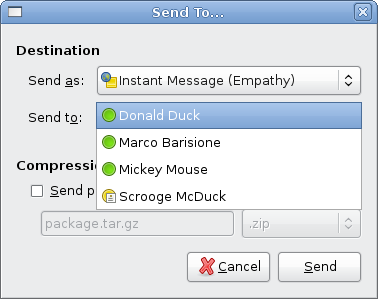
Empathy contacts displayed in nautilus-sendto

Sending a file with nautilus-sendto (Ogg Theora video, 156 kB)
More screenshots and videos are available on the project website.
Ten years ago the GNU Network Object Model Environment project was announced by Miguel de Icaza. Happy birthday GNOME!

Buenos días, amantes de la libertad!
I need an icon, under (L)GPL, for file transfers in Empathy as the current icon (stolen^Wcopied from gossip) is a bit ugly and 16×16 only. This icon would be used in the menu for the “Send File…” command, in the status icon when someone has offered a file and as the icon for the file transfer dialog.
Suggestions? Anyone who can help me?
 Marco Barisione's blog