Handling phone numbers

I’m often asked questions about the handling and parsing of phone numbers, so I’m going to explain how we do it on Maemo 5. I hope this can be useful also for developers of other applications.

There is no unique standardised way to write phone numbers; in the UK the phone number of the Buckingham Palace Visitor Office can be written as 02073212233, +44 (0)20 7321 2233, 0044 207 321 2233, etc. If you omit the international prefix +44, the number 02073212233 could be used by somebody else in another country, for instance to me it looks like a phone number for somebody living in Milan.

When storing a phone number you should keep it as you got it, including spaces, parenthesis, etc.
When you want to use the number you should drop all the useless characters, but keep the extensions numbers. For instance 44-555-P1 would become 44555P1, which means: call the Vodafone UK balance information number 44555, pause for some seconds waiting for the recorded voice to start speaking, and send a 1 (i.e. ask for a text message with the remaining minutes for this month).

When comparing phone numbers to see if they belong to the same contact you also want to strip all the extra digits sent after a pause as those are not really part of the phone number. At this point you still have to somehow handle the craziness of international and local prefixes, for instance all these numbers could be a valid way to call the same person in San Marino: 0549 123 456, +378 0549 123 456, +39 0549 123 456, 0039 0549 123 456, 011 39 0549 123 456.
How do phones handle this? Just by comparing the last 7 digits of the phone number, that is the minimum length used somewhere for phone numbers.
This of course leaves a chance of false matches, but as you can see there is no real generic solution for this.

Here’s some code to show how to handle phone numbers. I used Python as a sort of pseudo-language, so I preferred readability for non-Python developers over good pythonic code.

extension_chars = ('p', 'P', 'w', 'W', 'x', 'X')


def normalize_phone_number(number):
    common_delimiters = (',', '.', '(', ')', '-', ' ',
                         't', '/')
    valid_digits = ('#', '*', '0', '1', '2', '3', '4',
                    '5', '6', '7', '8', '9')

    normalized = ''

    for digit in number:
        if digit in extension_chars:
            # Keep the extension characters P, W and X,
            # but be sure they are upper case.
            digit = digit.upper()
        elif digit == '+':
            # "+" is valid only at the beginning of phone
            # numbers or after the number suppression
            # prefix. (No idea why we support only this
            # GSM code, but not the VSC ones.)
            if normalized not in ('', '*31#', '#31#'):
                print 'Wrong "+" in "%s"' % number
                # Skip this "+".
                continue
        elif digit in common_delimiters:
            # Skip this delimiter.
            continue
        elif digit in valid_digits:
            # Ok, let's keep it.
            pass
        else:
            # What is this? It doesn't seem valid but we
            # just keep it
            print 'Unknown character "%s" in "%s"' % 
                    (digit, number)

        normalized += digit

    return normalized


def remove_extension_chars(number):
    clean = ''

    for digit in number:
        if digit in extension_chars:
            # Extension character, drop this character and
            # the rest of the string.
            break

        clean += digit

    return clean


def phone_numbers_equal(number1, number2):
    number1 = normalize_phone_number(number1)
    number1 = remove_extension_chars(number1)

    number2 = normalize_phone_number(number2)
    number2 = remove_extension_chars(number2)

    # Compare only the last 7 digits.
    # If one of the numbers is shorter than 7 digits it's
    # important that the comparison is done on the full
    # length of the numbers and not only on the last tiny
    # bits of the 2 numbers.
    return number1[-7:] == number2[-7:]

Python code for handling phone numbers
(Download the full code with tests)

If you are handling phone numbers on Maemo 5, there are already some useful functions to use: e_​normalize_​phone_​number, osso_​abook_​phone_​numbers_​equal, osso_​abook_​contact_​matches_​phone_​number and osso_​abook_​query_​phone_​number.

Contacts merger 0.1.3 in Maemo extras-testing

Since my previous post about the contacts merger, I fixed a crash, made it handle better broken vcards, improved the partial matching and made the installer quit the address book when the plugin is installed, so no reboot is needed.
The new 0.1.3 merger is now available in Maemo extras-testing, just look for “Merge your duplicate contacts” in the application manager.

What’s next

Suppose I could have some spare time to write some small applications relating to the N900 address book; what would you want me to work on? The application should be small and not require changes to the closed source components. Suggestions are welcome in the comments, but I cannot assure you anything :)

Update: I meant extras-testing of course, not extras

Finding duplicate contacts in your address book

One of the common complaints about the Maemo address book is that it’s easy to get a lot of duplicate contacts as the address book is able to pull your contacts from various IM services. From the beginning there has been a way to merge duplicates, but it meant manually going through all of your contacts hunting down the duplicates.
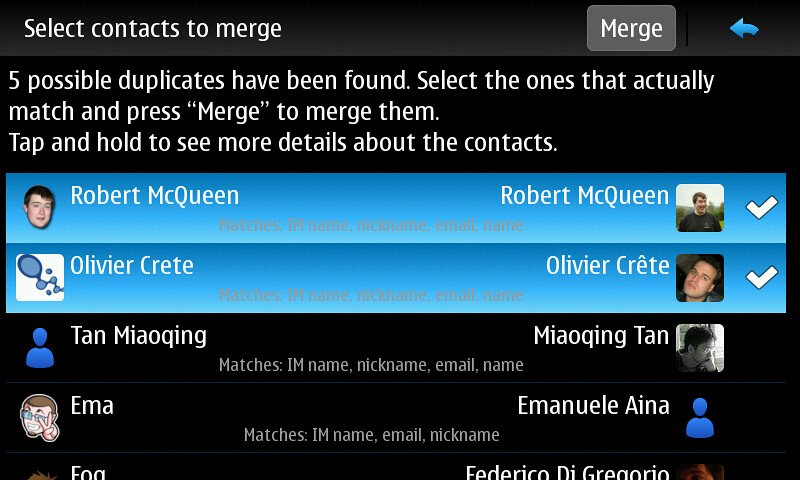
Today I finished writing the first version of a program that tries to automatically detect duplicates based on the IM names, emails, phone numbers and names. Of course this is just based on heuristics; you still have to go through the list and select the contacts that you want to merge. You can find this utility under the name “Merge your duplicate contacts” in the application manager and it’s available in Maemo extras-devel. Remember that extras-devel contains unstable software: enable it only if you really know what you are doing!
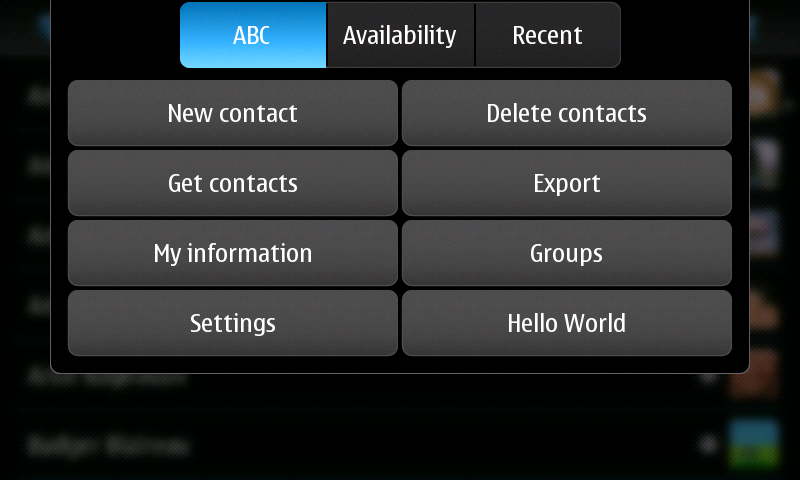
After installing Contacts Merger you have to reboot your phone[1] and then you will get a “Find duplicate contacts” button in the menu of the main address book window.

The window suggesting the possible merges

Update: I released 0.1.1 that fixes a crasher in case of malformed contacts.

Update 2: Forgot to say where to get the code.

[1] Sadly the address book doesn’t automatically load newly installed plugins without a restart; see bug #10542.

Plugins for the N900 address book

Finally the new update for Maemo 5 is out; it’s good to see that months of bug fixes and new features are finally available to everybody! One of the new features, not directly visible to users, is that developers can now add new buttons to the Contacts application menu. At the beginning we wanted to make the plugin system more powerful, but sadly it required too many changes and we didn’t have enough time to finish and test it properly.

A “Hello World” button added by the example plugin

To add new buttons you have to create a new object that derives from OssoABookMenuExtension and implements the required methods. For an example of this, see the example on gitorious that Mathias wrote and the API documentation.
Please, don’t go crazy with this new feature and don’t add 2000 different buttons to the menu!

Merge back your Facebook contacts

As I said in my previous blog post, some changes in the Facebook XMPP servers lead to the unmerging of the Facebook contacts that were merged with local contacts in the N900 address book. To fix this problem I wrote the small utility Facebook migrator, now available in Maemo extras-testing, that automatically merges back your contacts. Please remember that extras-testing contains unstable software and mine is not an exception! The source code is available on the Collabora git repositories.

If you have any feedback, please let me know in the comments to this post. The only known issue at the moment is that saving your contacts is quite slow, but I didn’t bother making it fast considering that it’s just a one time operation.

WordPress troubles

In other news, I noticed that I don’t get an email notification anymore when somebody comments on my blog, but a simple PHP script that uses the mail() function sends emails correctly. In the logs I don’t see anything useful and I’m sure the notifications are not in the spam folder. Does anybody have any suggestion on how to debug this?

Facebook and the N900 address book

The N900 address book can merge multiple contacts into a single entity: if you have a friend that has a phone number, an email address, a Jabber user name, a MSN one and so on, then you can merge all of the different entities into a single meta-contact.

Locally stored details and an IM user name in the same contact

The different IM contacts are tracked through their username and should be immutable[1], but yesterday Facebook changed all the IDs from something like “u123456789@chat.facebook.com” to “-123456789@chat.facebook.com”. For the address book this means that all the previous contacts were deleted from the IM roster and new contacts were added, so you get duplicate contacts. Moreover, when a contact is removed from the roster we leave the IM user name in the contact details, if you click the button you can add the contact back to one of your rosters. In the Facebook case this means that you end up with all of your meta-contacts with a useless button that cannot do nothing.

The fix for this is to remove the old IDs and merge your contacts again, simple but tedious. A better way to do it is to be patient and wait until I finish a program that will do it for you in a few click ;)

Update: I finished and release the program, see my blog post about Facebook migrator.

[1] Actually, some changes in the IDs are possible for normalisation purposes; if you add “FooBar@example.COM” it will become “foobar@example.com” in your roster. (And yes, the normalisation is buggy in PR1.1, but it will be fixed in PR1.2.)

GTK surprises on Maemo

Sometimes the creation of the contact chooser used on the N900 can be slow so, using callgrind and kcachegrind, I tried to understand what is the source of the slowness. This lead me to find some unexpected, and apparently undocumented, differences between upstream GTK and the Maemo version.

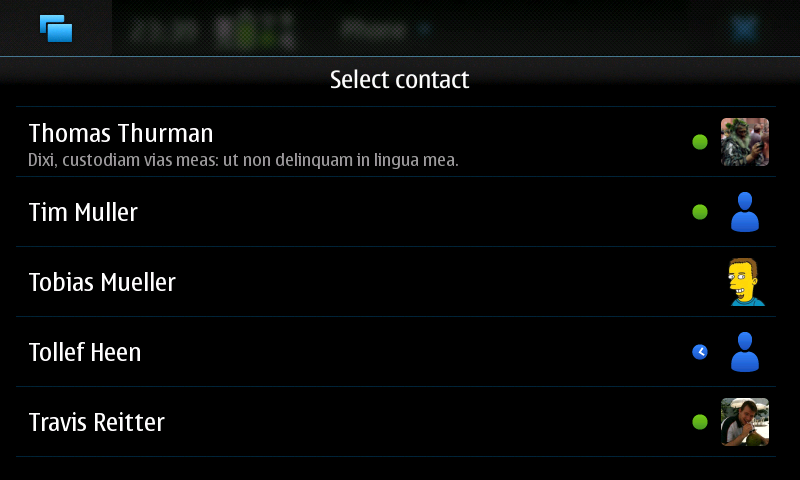
The Maemo 5 contact chooser

The widget contains a GtkTreeView that uses a model with just one column for the contact objects. How can its creation be so slow? To my surprise most of the time was spent decompressing the avatar images!
The avatars of the contacts are loaded, scaled and cropped in the cell data function of the GtkTreeViewColumn as, for various reasons, we cannot cache on disk the resulting image or generate it before the creation of the widget. Following calls of the cell data function for the same row won’t need to generate the avatar anymore. Doing non-trivial operations in the cell data function is not the nicest thing to do, but this should not be a problem as the cell data function is called only for the visible rows, right? No, at least not on Maemo!
To verify it just try this example program: on Maemo the cell_func() function is called once per item in the model plus once per visible item, elsewhere only once per visible item.

After a bit of investigation together with Claudio, we discovered that on Maemo there is a function called gtk_&#8203tree_&#8203view_&#8203column_&#8203get_&#8203cell_&#8203data_&#8203hint() that returns GTK_&#8203TREE_&#8203CELL_&#8203DATA_&#8203HINT_&#8203KEY_&#8203FOCUS, GTK_&#8203TREE_&#8203CELL_&#8203DATA_&#8203HINT_&#8203SENSITIVITY or GTK_&#8203TREE_&#8203CELL_&#8203DATA_&#8203HINT_&#8203ALL. The hint tells you why the function was called; in the example code the function is called on the hidden rows only to get their sensitivity so there is no need to set the “pixbuf” property of the cell at this point.

Just this tiny change in the address book code makes the contact chooser open much faster if you have a lot of contacts with big avatars, like the ones that Hermes creates. On the other hand the delayed loading made the scrolling become non-smooth :(
To fix the scrolling I had to implement some asynchronous loading of the avatars. The contact chooser now tries to load as many avatars as possible in idle moments and also tries to load first the avatars for the contacts that the user is more likely to see. The results seem quite good; now the contact list is fast, scrolling is smooth and the delayed loading of avatars should not be visible in normal cases.

jid-to-email

During the Christmas holidays I managed to find some time to write a couple of small programs related to the address book on the N900; they are nothing too fancy (no UI, no proper packaging, not the best code quality, etc.) as I wrote them for my personal use, but I still think it could be useful to share them with other people.

The one I’m talking about today is a simple command-line utility that adds an email address to your contacts based on the Jabber ID (or on the ID of other protocols). This is very useful to me as in Collabora we all have a roster automatically filled with the other Collaborans, this way I can automatically have their email addresses in my address book.

This cannot be done automatically for all the contact as, usually, it’s not true that a Jabber ID is also a valid email address (for instance it’s not true for jabber.org users), but it’s true at least for the GMail and Collabora servers.

If you want to try jid-to-email get the already compiled arm executable or the source code. Remember to take a backup before trying it, I don’t want to be blamed if something goes horribly wrong ;).

The program accepts two arguments: the vcard field for the IM protocol and a regular expression. For instance, if you cd to the directory where the program is and do “./jid-to-email X-JABBER @collabora.co.uk”, an email address will be added to all the contacts that have a Jabber ID containing “@collabora.co.uk”. Similarly “./jid-to-email X-JABBER ‘@g(oogle)?mail.com’” will add an email address to all the contacts with a Jabber ID containing “@gmail.com” or “@googlemail.com”. You could also try using “X-MSN” to do the same thing for contacts that use their GMail address as MSN ID.

Please, let me know if you know any other server where the Jabber ID is always a valid email address.

By the way, this week-end I’m going to Brussels for FOSDEM: hope to meet a lot of GNOME people there!

I'm going to FOSDEM, the Free and Open Source Software Developers' European Meeting

New #empathy IRC channel

In the last months the traffic on the #telepathy IRC channel on Freenode has been constantly growing, reaching the point where communication among developers is difficult and, at the same time, some new Empathy users are scared and don’t talk on the channel. This is why we just created a new #empathy channel on GIMPNet (irc.gnome.org) for all the empathy users, while #telepathy will be used for development-related discussions.

See you all on #empathy!