Behdad Esfahbod proposed to add spell checking, based on the Enchant library, to GLib and GTK+.
I tried some existing spell checking tools for GNOME:
Some time ago I wrote with Emanuele Aina some code forked from gedit. This, temporarily called GnomeSpellChecker, is unreleased and unfinished but has some interesting features, such as multi-language support.
In this post I’m considering only the UI of these libraries, I will read and analyze the code in the following days.
The contextual menu
All the libraries use the same approach, the wrong words are underlined in red. The popup menu displays the suggestions in a sub-menu.

GtkSpell3

SexySpellEntry

Gedit spell checking plugin
In GtkSpell3 and SexySpellEntry I don’t like the gtk-remove icon for the “Ignore” item. In gedit I don’t like the “…” after the “Spelling suggestions” string and the bold font for the suggestions.
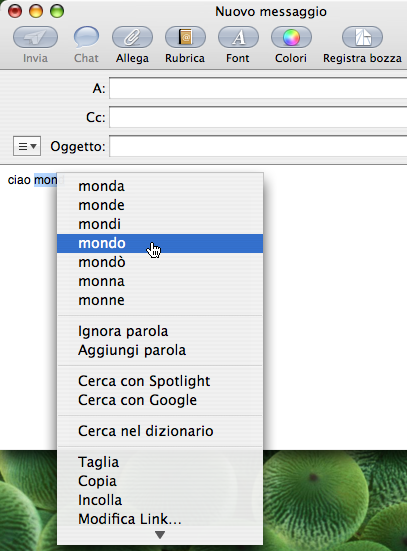
Microsoft Word’s menu is similar, instead Apple programs add the suggestions directly to the contextual menu.

Spell checking in Mail
Multilanguage support
The new spell checking stuff in GTK+ should allow to check more languages in the same widget. A good approach would be to recognize the language of a paragraph, as done by Microsoft Word, for this see libtextcat and its competitors. Paolo Maggi thinks that this is out of the scope of the spell checking library since it’s an application specific problem.
A simpler solution is to check words in the union of the used dictionaries. This is supported only by GtkSpell3 and by GnomeSpellChecker.

Spell checking with multiple languages in GtkSpell3
The GtkSpell3 implementation does not seem to work, “mondo” is in the Italian dictionary but it’s considered mispelled. I don’t like the multi-language menu because it adds another submenu, I propose something similar to the image below (made with GIMP):

Proposal for the contextual menu
Configuration
It would be a good thing to have a tool for control-center to set the languages, but please do not add yet another item to the preferences menu!

GnomeSpellChecker dialog to set the languages
This configuration tool could have some other options, e.g. to ignore words with numbers.
All the libraries can add a word to the personal dictionary, but there is no way to remove wrong words from it. It would be good to add such feature to the configuration tool.
Spell checking dialog
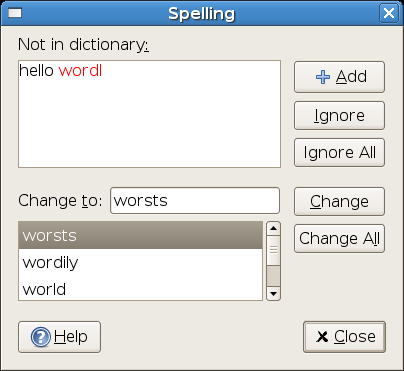
GtkSpell3 and SexySpellEntry do not have a dialog to do spell checking, this could be useful for longer texts, such as text files in gedit or forms in Epiphany. Word and AbiWord use similar dialogs, shown in the images below.

Word spell checking dialog

AbiWord spell checking dialog
I prefer the gedit dialog, but it does not show the context of the wrong word, this means that it could be difficult to understand what the word should be.

Gedit spell checking dialog

GnomeSpellChecker spell checking dialog
UPDATE: updated the menu proposal as suggested by Paolo.






 Marco Barisione's blog